
Rolling vs Blue-Green Deployment: Zero-Downtime Releases
Learn how rolling and blue-green deployments keep applications available during releases, how rollback works, and which strategy fits your production system.
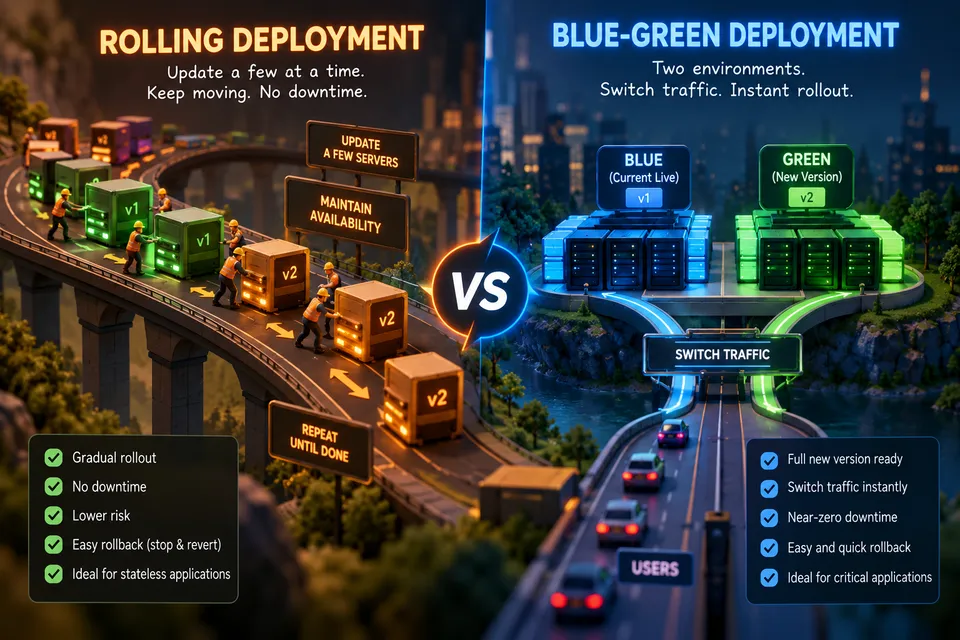
Rolling vs Blue-Green Deployment: Zero-Downtime Releases
Deploying new application code sounds simple:
Stop the old version → install the new version → start it again.
That approach works until the application needs to stay available while the deployment is happening.
For a production API serving thousands or millions of requests, shutting down every server just to release a new version creates an unnecessary outage.
The better approach is to change the application gradually while keeping healthy capacity available to serve users.
Two of the most important deployment strategies for achieving zero-downtime releases are:
- Rolling deployment
- Blue-green deployment
Both can keep an application available during a release, but they solve the problem differently.
This article explains how they work, what happens inside a load-balanced architecture, how rollback differs, and when you should choose one over the other.
- Rolling deployments replace instances gradually, reducing resource usage and deployment risk.
- Blue-green deployments run two environments, enabling fast traffic switching and rollback.
- Health checks and traffic management are essential for safe deployments.
- Zero downtime ≠ zero risk — databases, caches, sessions, queues, and workers can still fail.
- Backward-compatible migrations help old and new versions coexist safely.
- Always test rollback before deploying to production.
The Problem With Traditional Deployments
Imagine an application running on four servers:
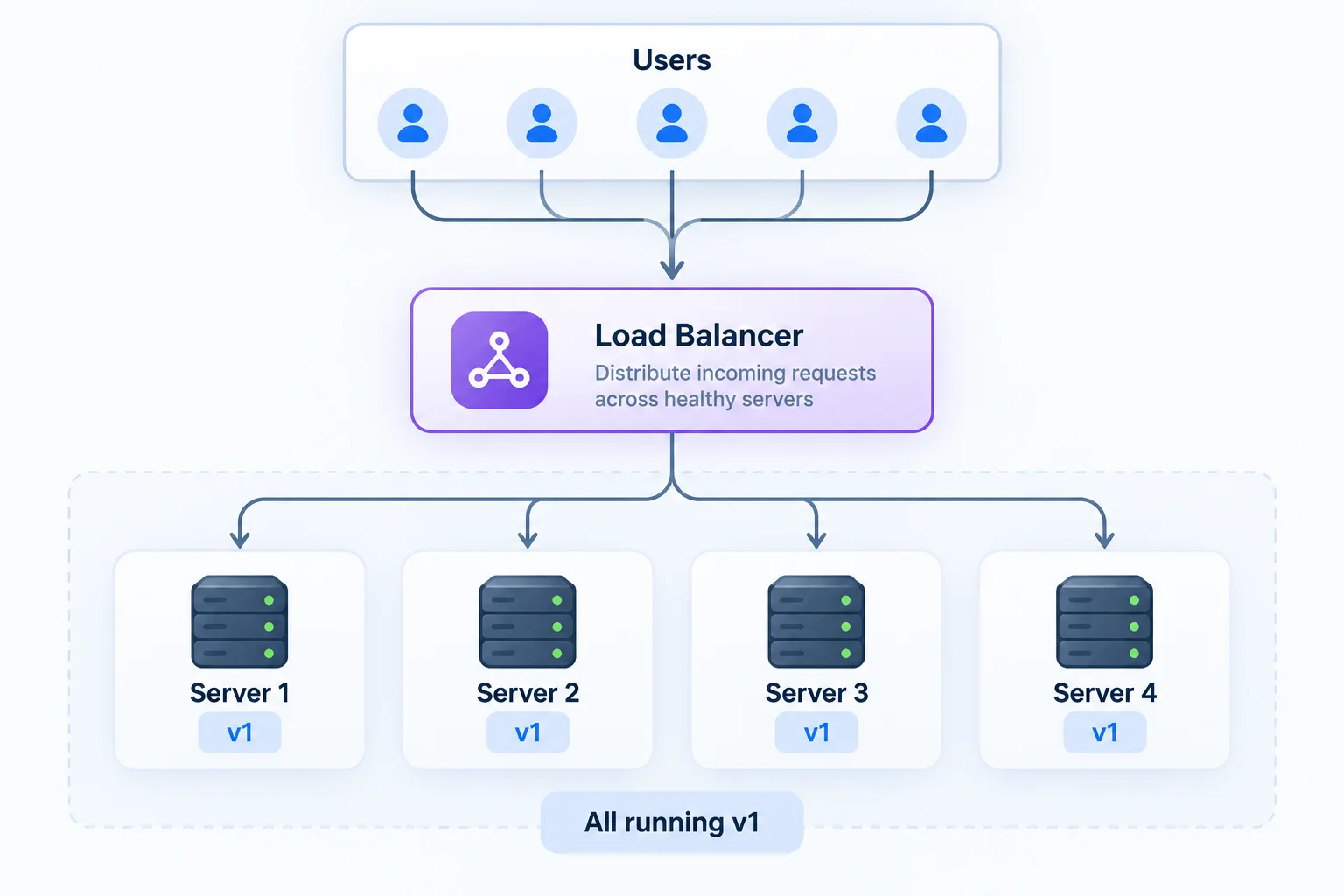
Now version v2 is ready.
A naive deployment process might be:
text1. Stop v1 2. Deploy v2 3. Start application 4. Repeat for every server
If all servers are stopped simultaneously:
Architecture DiagramMermaid Flow
Even if the application is unavailable for only a few seconds, users experience an outage.
The fundamental problem is simple:
You removed the capacity that was serving traffic before replacing it.
A safer deployment reverses that order.
Instead of removing everything first, maintain enough healthy capacity to serve traffic while the new version is being introduced.
The Core Principle: Separate Deployment From Traffic
A useful mental model is to think about deployments as two different operations:
- Put the new software somewhere
- Decide which software receives traffic
These operations do not necessarily have to happen at the same time.
A load balancer gives you that separation.
Architecture DiagramMermaid Flow
The load balancer can stop sending new requests to an instance while that instance is upgraded.
This idea is the foundation of rolling deployments.
Rolling Deployment
A rolling deployment gradually replaces the old application version with the new version.
Instead of replacing all four servers at once, a rolling deployment updates the fleet gradually while keeping enough healthy capacity available to serve traffic:
textInitial: v1 v1 v1 v1 Step 1: v2 v1 v1 v1 Step 2: v2 v2 v1 v1 Step 3: v2 v2 v2 v1 Complete: v2 v2 v2 v2
At each stage, healthy instances continue serving traffic.
The exact number of instances upgraded at a time depends on your deployment configuration and available capacity.
How a Rolling Deployment Works
Assume four production servers are currently running version v1.
Architecture DiagramMermaid Flow
The deployment controller upgrades one server at a time.
Step 1: Remove One Server From Traffic
Server 1 is deregistered from the load balancer.
Architecture DiagramMermaid Flow
The important detail is that deregistering should not necessarily mean immediately killing active requests.
A production system can allow in-flight requests to finish before terminating the old instance.
This behavior is commonly called connection draining or graceful termination.
Step 2: Deploy v2
Now Server 1 is updated:
textServer 1 → v2
The other servers continue running v1.
textServer 1 Server 2 Server 3 Server 4 v2 v1 v1 v1
At this point, two application versions coexist.
That is normal during a rolling deployment.
Step 3: Run Health Checks
Before sending production traffic back to Server 1, the deployment system should verify that the new version is healthy.
A simple health endpoint might be:
httpGET /health
Response:
json{ "status": "ok" }
But production health checks should often go beyond "the process is alive."
You may need to verify:
- Application startup completed
- Required configuration exists
- Critical dependencies are reachable
- Database connectivity works
- The process is accepting requests
- Readiness conditions are satisfied
A useful distinction is:
textLiveness → "Should this process still exist?" Readiness → "Can this instance safely receive traffic?"
The second question is especially important during deployments.
Step 4: Return the Server to the Load Balancer
Once Server 1 passes its readiness checks:
textServer 1 → healthy
the load balancer can send traffic to it again.
textServer 1 Server 2 Server 3 Server 4 v2 v1 v1 v1 ▲ │ traffic enabled
Now the deployment proceeds to the next server.
Step 5: Repeat
The same process happens for Server 2:
textv2 v1 v1 v1
Then Server 3:
textv2 v2 v1 v1
Then Server 4:
textv2 v2 v2 v1
Until the fleet reaches:
textv2 v2 v2 v2
The deployment is complete.
Rolling Deployment Architecture
Architecture DiagramMermaid Flow
The important idea is that the deployment controller does not blindly replace every instance.
It follows a controlled sequence:
textDrain ↓ Deploy ↓ Start ↓ Health check ↓ Ready ↓ Receive traffic ↓ Continue
Why Rolling Deployments Can Provide Zero Downtime
Suppose you have four healthy servers and update only one at a time.
During the update:
textServer 1 → v2 Server 2 → v1 Server 3 → v1 Server 4 → v1
Even while Server 1 is unavailable:
textHealthy capacity = Server 2 + Server 3 + Server 4
Traffic can continue flowing.
The important principle is not:
"Every server must always be available."
It is:
Enough healthy capacity must remain available to handle production traffic.
That distinction becomes important when designing large systems.
For example, upgrading 1 out of 100 servers is very different from upgrading 3 out of 4 servers.
If your application normally uses 80% of available capacity, removing 25% of the fleet may still cause overload even though some servers remain healthy.
So zero-downtime deployment requires both:
- Application availability
- Sufficient capacity
Rolling Deployment With Kubernetes
Kubernetes uses rolling updates as the default Deployment strategy.
A simplified Deployment might look like this:
yamlapiVersion: apps/v1 kind: Deployment metadata: name: api spec: replicas: 4 strategy: type: RollingUpdate rollingUpdate: maxUnavailable: 1 maxSurge: 1 selector: matchLabels: app: api template: metadata: labels: app: api spec: containers: - name: api image: example/api:v2 readinessProbe: httpGet: path: /ready port: 8080 initialDelaySeconds: 5 periodSeconds: 5
Here:
textreplicas = 4 maxUnavailable = 1 maxSurge = 1
controls how aggressively Kubernetes can replace the old pods.
Conceptually:
textDesired pods = 4 Old: v1 v1 v1 v1 During rollout: v1 v1 v1 v2 v1 v1 v2 v2 v1 v2 v2 v2 v2 v2 v2 v2
With maxSurge, Kubernetes can temporarily create additional pods during the update rather than immediately removing old capacity.
The exact rollout behavior depends on readiness state and deployment configuration.
The Hidden Problem: Mixed Versions
Rolling deployments have an important consequence:
For part of the deployment, multiple application versions are running simultaneously.
For example:
Architecture DiagramMermaid Flow
A user may send one request to v1 and another request to v2.
Therefore, application versions need to be compatible during the transition.
This is one of the most important production considerations.
API Compatibility
Suppose v1 sends:
json{ "user_id": 42 }
and v2 expects:
json{ "id": 42 }
During a rolling deployment:
textClient │ ├────► v1 → expects user_id │ └────► v2 → expects id
The system can break depending on which version receives the request.
A safer approach is to maintain compatibility across the transition.
For example:
textv1 → understands old format v2 → understands old + new format
Then later:
textv2 → only new format
This pattern is often called expand and contract.
Database Migrations Are More Dangerous
Application code is only one part of a deployment.
Consider a database migration:
sqlALTER TABLE users DROP COLUMN username;
If v1 still executes:
sqlSELECT username FROM users;
while v2 is being deployed, the rolling update can fail.
You now have:
textv1 ─────┐ ├──► Database v2 ─────┘
Both versions must coexist safely.
A safer migration often looks like this.
Phase 1 — Expand
Add the new structure without removing the old one.
sqlALTER TABLE users ADD COLUMN display_name TEXT;
Phase 2 — Deploy Compatible Code
Deploy code that can understand both structures.
Phase 3 — Migrate Data
Backfill or transform existing records.
Phase 4 — Switch Usage
Make the new column the primary source.
Phase 5 — Contract
Only after all old application versions are gone, remove the obsolete structure.
sqlALTER TABLE users DROP COLUMN username;
This is one reason deployment safety is larger than simply keeping servers alive.
Blue-Green Deployment
Rolling deployment upgrades the existing fleet gradually.
Blue-green deployment takes a different approach:
Keep the existing environment untouched and build a second environment for the new version.
Suppose Blue is currently serving production:
textLoad Balancer │ ▼ ┌────────────┐ │ BLUE │ │ v1 │ └────────────┘
You create an entirely separate Green environment:
textLoad Balancer │ ▼ ┌────────────┐ │ BLUE │ │ v1 │ └────────────┘ ┌────────────┐ │ GREEN │ │ v2 │ └────────────┘
Blue continues serving users.
Green can now be deployed and tested without replacing Blue.
How Blue-Green Deployment Works
Step 1: Blue Serves Production
textUsers │ ▼ Load Balancer │ ▼ BLUE v1
Everything is normal.
Step 2: Create Green
Deploy v2 to the second environment.
text┌──► BLUE v1 ──► Production │ Users ─► Router ─┤ │ └──► GREEN v2
Green does not initially receive normal production traffic.
Step 3: Test Green
You can run:
- Health checks
- Smoke tests
- Integration tests
- Synthetic requests
- Performance tests
- Security checks
- Database connectivity checks
You can also route controlled test traffic to Green.
The key advantage is that Blue remains available while Green is being validated.
Step 4: Switch Traffic
Once Green is healthy:
textBefore: Users → Load Balancer → BLUE v1
After:
textUsers → Load Balancer → GREEN v2
The traffic switch can happen through mechanisms such as:
- Load-balancer target groups
- Reverse proxies
- DNS
- Service meshes
- Kubernetes Services
- Ingress or gateway routing
The exact switching mechanism depends on your infrastructure.
Step 5: Keep Blue Temporarily
Do not immediately destroy Blue.
Keep it available during a bake period.
textGREEN → serving production BLUE → standby for rollback
If monitoring shows a problem:
textUsers │ ▼ Load Balancer │ ▼ BLUE v1
Traffic can be shifted back.
This is one of the strongest advantages of blue-green deployment.
Blue-Green Architecture
Architecture DiagramMermaid Flow
During normal operation:
textTraffic → Blue
During deployment:
textTraffic → Blue + Green
After successful validation:
textTraffic → Green
During rollback:
textTraffic → Blue
The Most Important Difference: Rollback
This is where the strategies really diverge.
Rolling Rollback
Imagine:
textv2 v2 v1 v1
and monitoring detects an error.
The deployment system must determine what to do with the partially updated fleet.
Depending on the platform, it may:
textv2 → v1 v2 → v1
or pause the rollout, replace failed instances, or trigger an automated rollback.
The process is more involved because the old environment is being modified during deployment.
The deployment system must restore the previous version across the instances that have already been updated.
Blue-Green Rollback
With blue-green:
textBLUE → v1 GREEN → v2
If Green fails:
textTraffic │ ▼ BLUE v1
The Green environment can remain available for debugging.
Rollback becomes a traffic-routing operation:
textRoute → Green
changes to:
textRoute → Blue
The old environment has not been overwritten.
That is why blue-green deployments can provide extremely fast rollback.
But Blue-Green Is Not Automatically Better
It sounds perfect:
Deploy Green → test → switch traffic → keep Blue for rollback.
But there is a cost.
You may need:
text2 × compute capacity 2 × application capacity 2 × networking configuration 2 × monitoring targets
at least temporarily.
For a large production system, that can become expensive.
There is also operational complexity around:
- Load balancers
- Target groups
- DNS
- TLS certificates
- Secrets
- Configuration
- Background workers
- Databases
- Queues
- Caches
- Stateful services
So the correct question is not:
"Which deployment strategy is better?"
The better question is:
"Which deployment strategy provides the right safety-to-cost ratio for this service?"
Rolling vs Blue-Green Deployment
| Characteristic | Rolling | Blue-Green |
|---|---|---|
| Infrastructure cost | Lower | Higher |
| Deployment model | Gradual replacement | Two environments |
| Old and new versions coexist | Yes | Yes |
| Environment isolation | Lower | Higher |
| Rollback | Gradual or platform-dependent | Traffic switch |
| Blast radius | Gradual | Small before cutover |
| Production validation | During rollout | Before full cutover |
| Capacity required | Similar to existing fleet, depending on surge | Approximately two environments |
| Implementation complexity | Lower | Higher |
| Best for | Resource-efficient releases | High-risk or fast-rollback releases |
The important trade-off is:
textRolling → Lower cost → Gradual rollout → More mixed-version complexity Blue-Green → Higher cost → Strong isolation → Faster rollback
Rolling vs Blue-Green vs Canary
There is another strategy worth understanding: canary deployment.
Canary deployment exposes the new version to only a small amount of production traffic first.
For example:
text100% traffic │ ▼ v1
Then:
text95% → v1 5% → v2
If metrics look healthy:
text75% → v1 25% → v2
Then:
text50% → v1 50% → v2
Eventually:
text0% → v1 100% → v2
This reduces the blast radius of a bad release.
A useful mental model is:
textRolling ↓ Replace infrastructure gradually Blue-Green ↓ Switch between environments Canary ↓ Shift production traffic gradually
These strategies can also be combined.
For example:
textBlue-Green + Canary Traffic + Automated Rollback
You can deploy a complete Green environment, expose it to a small percentage of production traffic, observe the results, and then progressively increase traffic.
A Production-Grade Deployment Pipeline
A mature deployment system should not simply execute:
textdeploy.sh
and hope everything works.
A safer pipeline looks more like:
Architecture DiagramMermaid Flow
The deployment should have explicit success criteria and failure criteria.
For example:
textSuccess: - Error rate below threshold - Latency within threshold - Health checks passing - No critical alerts Failure: - Error rate increases - Latency spikes - Readiness checks fail - Dependency failures increase - Business metrics degrade
This transforms deployment from a manual operation into a controlled engineering process.
What Should You Monitor?
A deployment is not successful simply because the process exits with status code 0.
Monitor application behavior.
Error Rate
Monitor:
textHTTP 5xx HTTP 4xx where relevant Unhandled exceptions Failed requests Timeouts
A release that starts successfully can still generate errors after receiving real traffic.
Latency
Monitor:
textp50 p95 p99
For example:
textBefore deployment: p95 = 180 ms After deployment: p95 = 950 ms
The application may technically be "healthy," but the deployment has degraded performance significantly.
Saturation
Monitor:
textCPU Memory Connection pools Thread pools Database connections Queue depth Disk I/O Network utilization
A deployment can introduce a memory leak or increase database usage without immediately producing HTTP errors.
Business Metrics
Technical metrics are not enough.
For an e-commerce application, also monitor:
textCheckout failures Payment failures Order creation rate Cart conversion
A deployment can have:
textCPU: normal Memory: normal HTTP 500: normal
while silently breaking checkout.
The strongest deployment systems monitor both:
textSystem health + Business health
Automated Rollback
The deployment controller can use monitoring signals to decide whether to continue.
For example:
textDeploy v2 │ ▼ Wait 2 minutes │ ▼ Check error rate │ ├── < 1% → Continue │ └── > 1% → Rollback
The exact thresholds should be based on the service's normal behavior rather than arbitrary numbers.
A useful production design is to compare the new version against a baseline:
textv1 error rate = 0.2% v2 error rate = 3.8%
That is a strong signal that something changed.
Automated rollback is particularly useful when deployments happen frequently.
Graceful Shutdown Matters
One commonly overlooked part of zero-downtime deployments is shutdown behavior.
Suppose a server is processing:
textPOST /checkout
and the deployment immediately kills the process.
The user could receive:
textConnection reset
even though another server is healthy.
A safer sequence is:
text1. Mark instance unavailable for new traffic 2. Stop accepting new requests 3. Finish in-flight requests 4. Close connections 5. Shut down process 6. Deploy new version 7. Start process 8. Wait for readiness 9. Re-enable traffic
This is especially important for APIs that handle:
- Long-running requests
- File uploads
- Payment operations
- Streaming responses
- WebSocket connections
- Background HTTP jobs
Graceful shutdown is therefore a critical part of zero-downtime deployment design.
Session Handling During Deployment
Sessions can introduce another problem.
Imagine a user is logged into Server 1:
textUser → Server 1 │ └── Session stored locally
During deployment, Server 1 is replaced.
The user's next request reaches Server 2:
textUser → Server 2
If the session only existed in Server 1's memory, the user may suddenly appear logged out.
This is why production applications commonly avoid instance-local session state.
Instead, sessions can be stored in shared infrastructure such as:
textApplication Servers │ ▼ Redis / Database / Shared Session Store
Then:
textRequest 1 → Server 1 → Shared Session Store Request 2 → Server 2 → Shared Session Store
The user's session survives the deployment.
Cache Compatibility
Caching introduces similar problems.
Suppose v1 stores:
textuser:42 → old-format-data
while v2 expects:
textuser:42 → new-format-data
During a rolling deployment:
textv1 ──┐ ├──► Shared Cache v2 ──┘
Both versions may access the same cache.
A deployment can therefore fail even if the database schema is compatible.
Safer strategies include:
- Versioned cache keys
- Backward-compatible cache formats
- Cache invalidation during controlled transitions
- Avoiding assumptions about cache contents
- Short cache TTLs for transitional data
For example:
textuser:v1:42 user:v2:42
can temporarily isolate incompatible cache representations.
Background Workers Need Special Handling
Suppose your system contains a background worker.
Blue:
textWorker v1 → process jobs
Green:
textWorker v2 → process jobs
During blue-green deployment, both environments might process the same queue.
That can cause:
textDuplicate emails Duplicate payments Duplicate notifications Duplicate event processing
The solution may involve:
- Idempotent jobs
- Distributed locks
- Leader election
- Separate worker deployment
- Queue consumer coordination
- Feature flags
- Version-aware job processing
A deployment architecture must therefore consider more than HTTP servers.
Idempotency Is a Deployment Safety Feature
Consider a payment request:
httpPOST /payments
Suppose the client sends a request to v1.
The server processes the payment, but the response is lost because the instance is terminated during deployment.
The client retries.
If the operation is not idempotent:
textRequest 1 → Payment created Request 2 → Payment created again
The customer may be charged twice.
A common approach is to use an idempotency key:
httpPOST /payments Idempotency-Key: 8c7f2e...
The backend stores the result associated with that key.
Then repeated requests can safely return the original result.
This is not exclusively a deployment technique, but graceful deployment makes these failure scenarios much more important.
Database Migrations and Rollbacks
Application rollback and database rollback are not always the same thing.
Suppose:
textv1 → old schema v2 → new schema
You deploy v2 and then discover a serious application bug.
You might think:
textRollback v2 → v1
But what if v2 already changed the database?
textv2 │ ├── writes new data │ ▼ Database
Now v1 may no longer understand the data.
This is why destructive database migrations should be separated from application deployment.
A safer model is:
textExpand ↓ Deploy compatible application ↓ Migrate data ↓ Switch application behavior ↓ Remove old schema later
This makes rollback significantly safer.
Feature Flags and Deployment Strategies
Feature flags can make deployments even safer.
Instead of tying deployment directly to feature activation:
textDeploy code = Feature enabled
separate the two:
textDeploy code ↓ Feature disabled ↓ Validate ↓ Enable for small audience ↓ Monitor ↓ Enable for everyone
For example:
textv2 deployed feature_x = false
After validation:
textfeature_x = true for 5%
Then:
textfeature_x = true for 25%
Then:
textfeature_x = true for 100%
This is particularly useful when combined with canary deployments.
Common Mistakes
1. Calling a Running Process "Healthy"
A process can be alive while the application is broken.
textProcess: running Database: unreachable Application: broken
Use meaningful readiness checks.
2. Ignoring Connection Draining
Immediately terminating an instance can kill active requests.
Use graceful shutdown and appropriate load-balancer deregistration behavior.
3. Breaking Database Compatibility
This is one of the most common causes of failed rolling deployments.
Remember:
textOld application + new database New application + old database
may temporarily coexist.
Design migrations accordingly.
4. Forgetting Background Workers
If two versions process the same queue, duplicate work can occur.
Make jobs idempotent and explicitly design worker deployment behavior.
5. Switching 100% Traffic Without Monitoring
Even a healthy staging environment can behave differently under real production traffic.
A safer approach is:
textDeploy ↓ Validate ↓ Shift traffic ↓ Observe ↓ Complete
rather than:
textDeploy ↓ 100% traffic ↓ Hope
6. Destroying the Old Environment Too Quickly
With blue-green deployment, the old environment is your rollback safety net.
If you immediately delete Blue after moving traffic to Green:
textGreen fails ↓ Blue already destroyed ↓ Rollback becomes much harder
Keep the old environment available for an appropriate observation period.
7. Treating Health Checks as the Only Signal
A health endpoint can return:
json{ "status": "ok" }
while customers are experiencing:
textPayment failures Slow checkout Missing data Broken recommendations
Combine infrastructure health with application and business metrics.
When Should You Choose Rolling Deployment?
Rolling deployment is often a strong default when:
- Infrastructure cost matters
- The application is stateless
- Versions are backward compatible
- Rollback can tolerate some time
- The service is large enough that duplicating the entire environment is expensive
- You already have a capable orchestrator such as Kubernetes
- You can safely operate mixed versions during the rollout
A rolling strategy provides a practical balance between deployment safety and infrastructure efficiency.
When Should You Choose Blue-Green?
Blue-green becomes attractive when:
- Rollback must be extremely fast
- You need strong environment isolation
- The release is high-risk
- You want to validate the new environment before full traffic migration
- The infrastructure can afford temporary duplication
- Traffic switching is easy to automate
- You need a clean separation between current and candidate versions
For critical systems, the ability to keep the previous environment intact can be worth the additional infrastructure cost.
When Should You Choose Canary?
Canary deployment is useful when the primary concern is limiting the blast radius.
Consider a service used by millions of users.
Instead of sending everyone to v2:
text100% → v2
you might start with:
text99% → v1 1% → v2
Then evaluate:
textError rate Latency CPU Memory Business metrics
If everything looks healthy:
text95% → v1 5% → v2
Then:
text75% → v1 25% → v2
And eventually:
text0% → v1 100% → v2
This can be safer than an immediate full cutover.
A Practical Decision Framework
Use this simplified decision tree:
textNeed a deployment? │ ▼ Is instant rollback critical? / \ Yes No │ │ ▼ ▼ Blue-Green Is infrastructure cost important? / \ Yes No │ │ ▼ ▼ Rolling Blue-Green
If your main concern is limiting the number of users exposed to a new release:
textNeed small blast radius? │ Yes │ ▼ Canary
For mature platforms, you can combine these strategies.
For example:
textBlue-Green + Canary + Automated Rollback + Feature Flags
This gives you several independent safety mechanisms.
Example: Production Deployment Strategy
Imagine an API with:
text20 application instances Kubernetes PostgreSQL Redis Load Balancer Background workers
A strong deployment process could look like:
text1. Build v2 ↓ 2. Run unit/integration tests ↓ 3. Build container image ↓ 4. Deploy a small number of v2 pods ↓ 5. Wait for readiness ↓ 6. Run smoke tests ↓ 7. Shift a small amount of traffic ↓ 8. Monitor error rate and latency ↓ 9. Increase traffic gradually ↓ 10. Complete rollout ↓ 11. Keep rollback capability temporarily
Meanwhile, the database migration follows:
textExpand schema ↓ Deploy compatible code ↓ Backfill data ↓ Switch reads/writes ↓ Observe ↓ Remove old schema later
This is much safer than treating application deployment as a single command.
Zero Downtime Is a System Property
There is an important lesson here.
You cannot guarantee zero downtime simply by choosing a deployment strategy.
The entire system must support the deployment model.
You need:
textLoad Balancing + Health Checks + Graceful Shutdown + Backward Compatibility + Safe Database Migrations + Observability + Automated Rollback + Capacity Planning
If any critical piece is missing, the deployment can still cause an outage.
For example:
textPerfect rolling deployment + Breaking database migration = Production outage
Or:
textPerfect blue-green deployment + Shared incompatible database schema = Production outage
The deployment mechanism is only one part of release engineering.
A Better Mental Model for Zero-Downtime Deployments
Think about a deployment as a controlled state transition:
text┌───────────────┐ │ v1 live │ └───────┬───────┘ │ ▼ ┌───────────────┐ │ Deploy v2 │ │ beside v1 │ └───────┬───────┘ │ ▼ ┌───────────────┐ │ Health checks │ └───────┬───────┘ │ ▼ ┌───────────────┐ │ Shift traffic │ └───────┬───────┘ │ ┌────┴────┐ │ │ Healthy Failed │ │ ▼ ▼ Complete Rollback
The key principle is:
Never make the new version the only available version until you have enough evidence that it works.
Rolling vs Blue-Green: The Mental Model
If you remember only two diagrams, remember these.
Rolling Deployment
textv1 v1 v1 v1 ↓ v2 v1 v1 v1 ↓ v2 v2 v1 v1 ↓ v2 v2 v2 v1 ↓ v2 v2 v2 v2
Replace gradually.
Blue-Green Deployment
textBLUE = v1 ──────────┐ │ ├──► Traffic │ GREEN = v2 ──────────┘ ▲ │ Switch traffic
Build separately, then switch.
That difference explains most of the trade-offs.
Frequently Asked Questions
Is rolling deployment really zero downtime?
It can provide zero downtime when there is sufficient healthy capacity, graceful termination, correct readiness checks, and compatible application/database changes.
The deployment strategy alone does not guarantee zero downtime.
Is blue-green deployment better than rolling deployment?
Not universally.
Rolling deployments usually consume fewer resources, while blue-green deployments make environment isolation and rollback easier.
The right choice depends on cost, risk, architecture, and rollback requirements.
Can rolling deployment cause errors for users?
Yes.
During a rollout, different instances may run different application versions.
If those versions are incompatible, requests can fail.
Backward compatibility is therefore essential.
Why do we need health checks?
A process can start successfully while the application itself is not ready to serve traffic.
Readiness checks help ensure that only usable instances receive requests.
Why is database migration important for zero-downtime deployment?
Because old and new application versions may temporarily access the same database.
A destructive schema change can break the old version while it is still serving traffic.
Use backward-compatible migrations whenever multiple versions can coexist.
Can blue-green deployment work with one database?
Yes, but the application versions must be compatible with the shared database schema and data.
The deployment architecture does not automatically isolate database state.
Can rolling and blue-green deployments be combined?
Yes.
For example, you can create a Green environment and then gradually send production traffic to it using a canary-style rollout.
This combines environment isolation with controlled traffic shifting.
What happens if the new version fails during a rolling deployment?
The rollout should pause or trigger rollback based on deployment configuration and monitoring signals.
The deployment controller can restore updated instances to the previous version or stop the rollout before the entire fleet is affected.
What happens if Green fails in a blue-green deployment?
If Blue is still available, traffic can be routed back to Blue.
This is one of the primary advantages of blue-green deployment.
Final Takeaways
A production deployment should not require you to choose between shipping code and keeping the application available.
Rolling deployment solves this by gradually replacing instances while maintaining healthy capacity.
Blue-green deployment solves it by creating a parallel environment and moving traffic between the old and new versions.
Neither is universally superior.
Choose rolling deployments when resource efficiency and gradual replacement matter.
Choose blue-green deployments when isolation, validation, and rapid rollback are more important than the cost of duplicate infrastructure.
Choose canary deployments when minimizing the number of users exposed to a new release is the primary goal.
And regardless of the strategy, production-grade deployments should include:
- Readiness and health checks
- Graceful shutdown
- Connection draining
- Backward-compatible APIs
- Expand-and-contract database migrations
- Session and cache compatibility
- Idempotent background processing
- Deployment monitoring
- Automated failure detection
- A well-tested rollback path
- Capacity planning
The real goal is not simply:
"Deploy without downtime."
It is:
"Change production safely while retaining the ability to recover quickly."
That is the foundation of reliable continuous delivery.
References
- Kubernetes Deployment documentation — rolling update configuration and deployment behavior.
- AWS — deployment methods including rolling, blue-green, immutable, and canary strategies.
- AWS — blue-green deployment methodology and rollback principles.
- Amazon ECS — deployment strategies and deployment safety mechanisms.
Editorial Transparency & Verification Standards
Provenance, research methodology & primary citations
Staff-written distributed systems architectural explainer adhering to NexusBlog rigorous verification and reproducibility standards.
All architectural diagrams, code snippets, and distributed protocol assertions are technically reviewed prior to release.
Dev
@krish
Core technical contributor to NexusBlog.
Discussion & Technical Notes0
Peer architectural reviews, benchmark insights, and implementation Q&A
Sign in to ask questions, share benchmark findings, or participate in architecture reviews.
Loading discussions...