
BullMQ in Node.js: A Complete Guide to Background Jobs
Learn how BullMQ and Redis power reliable background job processing in Node.js, with practical examples of workers, retries, concurrency, scheduling, and production-ready queue architecture.
Redis Zero to End: From Fundamentals to Production
Master Redis from fundamentals to advanced production architecture with this comprehensive learning series. Learn Redis data types, commands, caching strategies, TTL and eviction policies, persistence, RDB and AOF, transactions, Pub/Sub, Streams, distributed locks, rate limiting, and Redis-backed job queues with BullMQ. Explore replication, Sentinel, Cluster, performance optimization, security, monitoring, and real-world system design patterns through practical examples and production-focused guides. Ideal for developers and engineers building fast, reliable, and scalable backend systems.
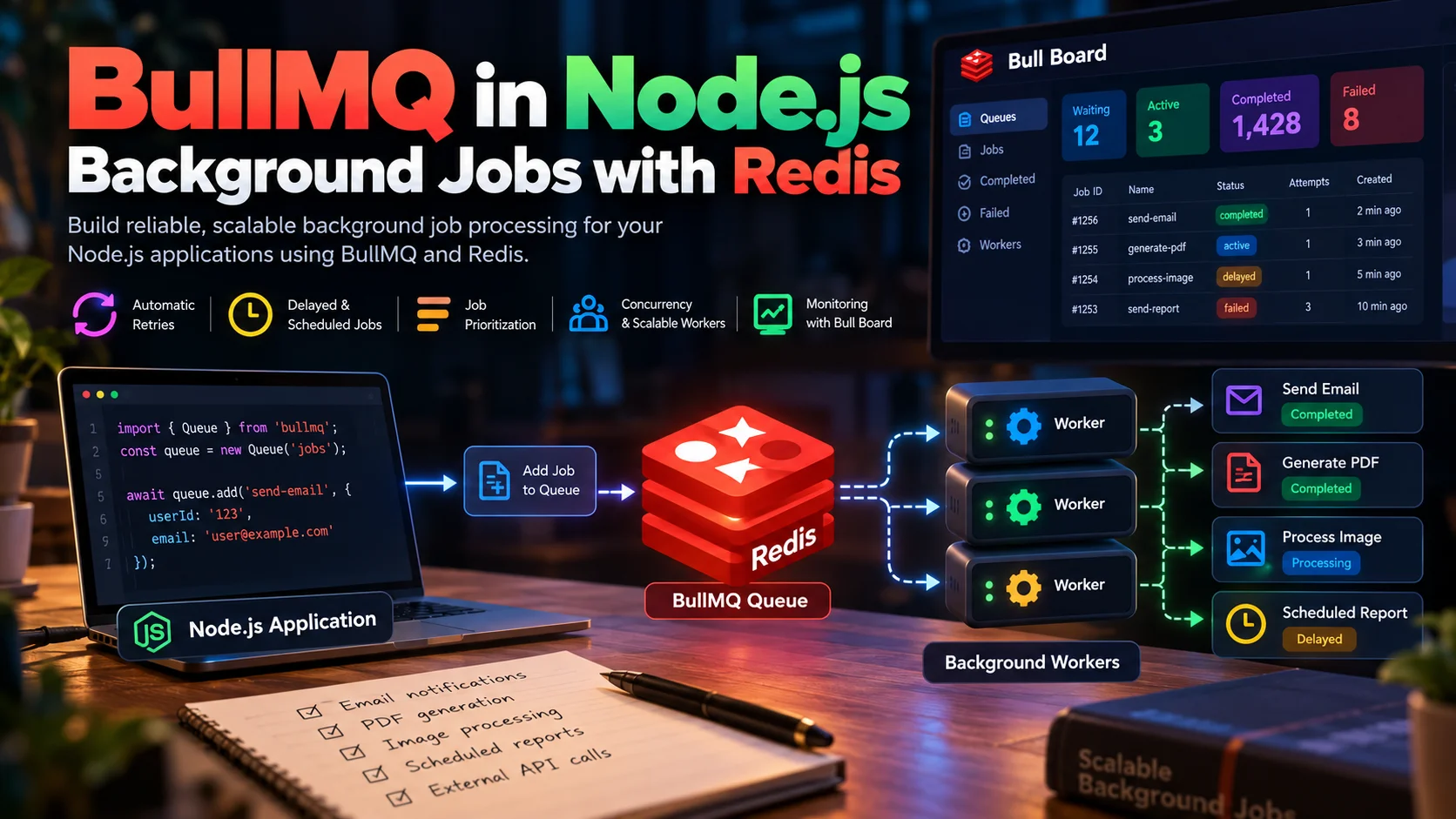
Your API shouldn't have to do everything at once.
Imagine a user signs up for your application. You need to create their account, send a welcome email, generate a PDF report, update analytics, and notify another service.
Should the user wait for every task to finish before receiving a response?
Usually, no. Your API should complete the essential operation quickly and delegate time-consuming work to background workers.
This is where BullMQ in Node.js becomes useful.
BullMQ is a Redis-backed job queue for Node.js that helps applications process background tasks asynchronously. It supports automatic retries, delayed jobs, scheduling, concurrency, job prioritization, and distributed workers.
In this guide, you'll learn how BullMQ works, how to implement it in a Node.js application, and what it takes to operate a reliable queue in production.
Key Takeaways
- BullMQ separates request handling from time-consuming background processing.
- Redis stores queue data and coordinates job processing.
- Workers execute jobs independently of the API server.
- Retries and backoff help recover from temporary failures.
- Concurrency and horizontal scaling allow workers to process more jobs.
- Idempotency and monitoring are essential for reliable production systems.
What Is BullMQ?
BullMQ is a Node.js library that provides a job queue built on Redis.
A job queue allows an application to accept work now and execute it later, independently of the original HTTP request.
Instead of generating a report directly inside an API handler, your application creates a job describing the work. A separate worker retrieves that job and generates the report in the background.
For example:
| Task | Without a queue | With BullMQ |
|---|---|---|
| Send welcome email | API waits for email processing | Worker sends the email |
| Generate PDF | Request may take several seconds | Job runs asynchronously |
| Process images | Consumes API server resources | Dedicated worker handles processing |
| Call external APIs | Request depends on external service latency | Worker retries recoverable failures |
| Generate scheduled reports | Requires custom scheduling logic | Delayed and repeatable jobs |
BullMQ is particularly useful when a task is slow, expensive, retryable, or does not need to finish before the API responds.
BullMQ vs. Redis
These technologies work together, but they have different responsibilities.
- Redis is the data store and coordination layer.
- BullMQ implements queue behavior, job states, worker coordination, retries, scheduling, and related processing features.
Redis alone does not automatically provide all the job-processing semantics that BullMQ implements.
How BullMQ Works
A typical BullMQ architecture contains four main components:
- Producer: Creates and submits jobs.
- Queue: Provides the interface for adding jobs and managing queue configuration.
- Redis: Stores job data and queue state.
- Worker: Retrieves and executes jobs.
Here's the high-level flow:
The important distinction is that the API and worker are separate execution paths. They may run in different processes, containers, or servers.
Step 1: The API Creates a Job
When a user signs up, the API creates the account and adds a welcome-email job to a queue.
The job contains the information needed by the worker, such as the user's ID and email address.
Step 2: BullMQ Stores the Job in Redis
BullMQ uses Redis to maintain job data and coordinate queue operations.
The job can remain pending until a worker is available. This helps absorb temporary traffic spikes without requiring the API to perform all the work immediately.
Step 3: A Worker Processes the Job
A worker listens to the queue and processes eligible jobs.
For example, an email worker retrieves the user's details and calls an email delivery provider.
Workers can run independently of the API server, allowing the application to scale request handling and background processing separately.
Step 4: BullMQ Handles Failures
If a job fails, BullMQ can retry it according to its configured attempt count and backoff strategy.
For example, if an external email provider temporarily returns an error, the worker can retry after a delay instead of immediately abandoning the task.
Step 5: The Job Reaches a Final State
A successfully processed job is marked as completed. A job that exhausts its configured attempts can enter the failed state.
Completed and failed job records can be retained for debugging or removed according to the queue's retention policy.
Installing BullMQ in Node.js
Let's build a small background-job system using Node.js, TypeScript, BullMQ, and Redis.
You'll need a supported Node.js runtime and a reachable Redis instance.
1. Install the Dependencies
BullMQ uses Redis connections internally. Installing ioredis explicitly is useful when you also need to create and manage Redis connections in your application.
2. Start Redis Locally
If Docker is installed, you can start a local Redis instance:
This command is suitable for local development, not a production Redis deployment. Production environments should use appropriate authentication, network isolation, persistence settings, monitoring, and a tested recovery strategy.
3. Configure the Environment
Create a .env file or configure these values through your deployment environment:
REDIS_HOST=127.0.0.1
REDIS_PORT=6379For simplicity, the examples below read these variables directly from process.env. A production application should validate configuration during startup.
Building Your First BullMQ Queue
Let's create a queue that sends welcome emails.
We'll separate the producer and worker so the API can enqueue jobs without executing them.
Create the Queue
Create src/queue.ts:
import { Queue } from "bullmq";
export const emailQueue = new Queue("email-jobs", {
connection: {
host: process.env.REDIS_HOST ?? "127.0.0.1",
port: Number(process.env.REDIS_PORT ?? 6379),
},
});The queue is named email-jobs.
The producer will use this queue to add jobs, and workers configured for the same queue name and Redis deployment can process them.
Add a Job to the Queue
Create src/producer.ts:
import { emailQueue } from "./queue";
async function enqueueWelcomeEmail() {
const job = await emailQueue.add(
"send-welcome-email",
{
userId: "user_123",
email: "user@example.com",
},
{
attempts: 3,
backoff: {
type: "exponential",
delay: 1000,
},
removeOnComplete: {
age: 3600,
count: 1000,
},
removeOnFail: {
age: 86400,
},
}
);
console.log("Queued job:", job.id);
await emailQueue.close();
}
enqueueWelcomeEmail().catch((error) => {
console.error("Failed to enqueue email:", error);
process.exitCode = 1;
});Let's understand the important options:
attempts: 3allows up to three processing attempts in total.backoffdelays retries using an exponential strategy.removeOnCompletelimits completed-job retention.removeOnFailconfigures retention for failed jobs.
Retention settings are important because completed and failed jobs consume Redis resources. Choose values based on operational requirements and debugging needs.
Notice that the job payload contains a user ID and email address. In a larger system, you may prefer storing only a stable identifier and retrieving the latest user information inside the worker.
Create the Worker
Create src/worker.ts:
import { Worker } from "bullmq";
const worker = new Worker(
"email-jobs",
async (job) => {
const { userId, email } = job.data;
console.log(`Sending welcome email to ${email}`);
console.log(`Associated user: ${userId}`);
// Replace this section with a real email provider.
await sendWelcomeEmail(email);
return {
success: true,
userId,
};
},
{
connection: {
host: process.env.REDIS_HOST ?? "127.0.0.1",
port: Number(process.env.REDIS_PORT ?? 6379),
},
concurrency: 5,
}
);
async function sendWelcomeEmail(email: string): Promise<void> {
// Integrate your email delivery provider here.
console.log(`Email delivery placeholder for ${email}`);
}
worker.on("completed", (job) => {
console.log(`Job ${job.id} completed`);
});
worker.on("failed", (job, error) => {
console.error(`Job ${job?.id} failed:`, error.message);
});
worker.on("error", (error) => {
console.error("Worker error:", error);
});The sendWelcomeEmail function is intentionally a placeholder. It demonstrates the queue lifecycle without claiming that an actual email is sent.
Replace it with a real email-provider integration before using this in an application.
The worker's concurrency: 5 option allows up to five jobs to be processed concurrently by this worker instance. It does not guarantee five times the throughput; the result depends on the task, external dependencies, and available resources.
Run the Producer and Worker
Start the worker in one terminal:
npx tsx src/worker.tsThen submit a job in another terminal:
npx tsx src/producer.tsYou should see the worker log that it received and processed the job.
The producer and worker can now run independently.
Understanding BullMQ Retries and Backoff
Background jobs often fail because of temporary problems:
- An email provider times out.
- A remote API returns a temporary server error.
- A database connection drops.
- A rate limit temporarily blocks requests.
- A dependent service becomes unavailable.
Without retries, every temporary failure may require manual intervention.
BullMQ supports retry configuration at the job level.
await emailQueue.add(
"send-notification",
{
userId: "user_123",
},
{
attempts: 5,
backoff: {
type: "exponential",
delay: 1000,
},
}
);With exponential backoff, the delay increases between retries. The approximate base delay for this example grows from one second to two seconds, then four seconds, and so on, subject to BullMQ's scheduling behavior and any configured jitter.
Why Backoff Matters
Suppose a payment provider becomes unavailable for 30 seconds. If thousands of workers retry every failed request immediately, they may overload the provider further.
A backoff strategy spreads retries over time and reduces pressure on an unhealthy dependency.
For production systems:
- Retry transient failures rather than every possible error.
- Use bounded attempts.
- Consider jitter to reduce synchronized retry bursts.
- Respect external API rate limits.
- Alert on persistent failures.
- Keep failed jobs available for investigation when appropriate.
Delayed and Scheduled Jobs
Not every task should run immediately.
Examples include:
- Sending a reminder tomorrow.
- Retrying an operation after a cooldown period.
- Scheduling a report.
- Expiring an invitation after a specified interval.
BullMQ supports delayed jobs:
await emailQueue.add(
"send-reminder",
{
userId: "user_123",
},
{
delay: 60_000,
}
);The delay option specifies a delay of 60,000 milliseconds, or one minute.
A delayed job becomes eligible for processing after its delay. This is not a guarantee of execution at an exact wall-clock instant: actual processing also depends on worker availability, Redis, scheduling behavior, and system load.
For recurring tasks, BullMQ provides repeatable-job and job-scheduler capabilities. Check the documentation for the API supported by your installed BullMQ version, as scheduling APIs have evolved.
Official documentation: https://docs.bullmq.io/guide/job-schedulers
Job Prioritization
Some tasks matter more than others.
For example, a password-reset email may deserve higher priority than a nightly analytics export.
BullMQ allows jobs to be assigned priorities:
await emailQueue.add(
"password-reset",
{
userId: "user_123",
},
{
priority: 1,
}
);
await emailQueue.add(
"marketing-email",
{
campaignId: "campaign_456",
},
{
priority: 10,
}
);In BullMQ, lower numerical priority values represent higher priority. Jobs without an explicit priority follow BullMQ's default-priority behavior.
Priorities are useful when multiple kinds of work share a queue, but they should not be treated as a complete scheduling policy. A large backlog of high-priority work can delay lower-priority jobs.
For critical workloads, consider separate queues and worker pools so noncritical tasks cannot consume all available processing capacity.
Scaling BullMQ Workers
One of the biggest benefits of a queue is independent scaling.
Suppose your API receives 500 requests per second, but each request may trigger background processing. Increasing API replicas alone may not improve the rate at which background tasks finish.
You need enough workers to process the incoming workload.
There are two common scaling approaches.
1. Increase Worker Concurrency
const worker = new Worker(
"email-jobs",
async (job) => {
await sendWelcomeEmail(job.data.email);
},
{
connection: {
host: process.env.REDIS_HOST ?? "127.0.0.1",
port: Number(process.env.REDIS_PORT ?? 6379),
},
concurrency: 20,
}
);Higher concurrency is often useful for I/O-bound tasks, such as network requests, because a worker can make progress on other jobs while waiting for external responses.
However, concurrency is not a universal performance multiplier. If tasks are CPU-bound, excessive concurrency may increase contention and latency.
2. Run Multiple Worker Processes
You can run multiple worker instances against the same queue and Redis deployment.
Producer / API
|
v
BullMQ Queue
|
v
Redis
/ | \
/ | \
v v v
Worker 1 Worker 2 Worker 3Each worker competes for eligible jobs through BullMQ's queue coordination mechanisms.
This allows background processing to scale independently of API traffic. It also means workers must be safe to run across multiple processes and machines.
Estimate Required Processing Capacity
A useful first approximation is:
[ \text{Required concurrency} \approx \text{Arrival rate} \times \text{Average processing time} ]
For example, suppose your system receives 10 jobs per second and each job takes an average of two seconds.
[ 10 \times 2 = 20 ]
You need approximately 20 concurrently active job slots to keep up with that average arrival rate under idealized steady-state assumptions.
This is only a planning estimate. Real systems need headroom for variable processing times, retries, rate limits, CPU constraints, and traffic spikes.
If the average arrival rate exceeds the sustainable processing rate for long enough, the queue backlog will grow.
BullMQ vs. Synchronous API Processing
| Concern | Synchronous processing | BullMQ background processing |
|---|---|---|
| API latency | Includes task execution time | Usually limited to request and enqueue work |
| Failure handling | Often tied to the request lifecycle | Can retry jobs independently |
| Scaling | API and task execution scale together | API and workers scale separately |
| Scheduling | Requires additional implementation | Supports delayed and scheduled jobs |
| Operational complexity | Simpler initially | Requires Redis, workers, and monitoring |
| Result delivery | Available within the request | May require status polling, events, or notifications |
Background processing is not always the right answer.
If a client needs an immediate calculation to display a result, synchronous processing may be simpler. If a task must be durably accepted before returning success, queueing can help, but the API must handle enqueue failures and define exactly what acceptance means.
BullMQ vs. Other Queue Technologies
BullMQ is not the only option for asynchronous work.
| Technology | Best suited for | Main consideration |
|---|---|---|
| BullMQ | Node.js background jobs using Redis | Requires Redis operations and queue management |
| RabbitMQ | Message routing and broker-based messaging | Requires broker topology and delivery configuration |
| Apache Kafka | Durable event streams and replayable event data | Requires partitioning, consumer-group, and retention design |
| AWS SQS | Managed queueing on AWS | Cloud-specific service semantics and limits |
| In-process task execution | Simple short-lived tasks | Work can be lost when the process stops |
BullMQ is a strong choice when your application already uses Redis and you want a feature-rich queue integrated with Node.js.
If you need long-lived event streams, complex broker routing, or a managed cloud queue, compare the alternatives against your workload and operational constraints.
For further reading:
- BullMQ documentation: https://docs.bullmq.io/
- RabbitMQ documentation: https://www.rabbitmq.com/docs
- Apache Kafka documentation: https://kafka.apache.org/documentation/
- Amazon SQS documentation: https://docs.aws.amazon.com/AWSSimpleQueueService/latest/SQSDeveloperGuide/welcome.html
Production Best Practices for BullMQ
A working queue is only the beginning. Production reliability depends on how jobs are designed, monitored, secured, and recovered.
1. Design Jobs to Be Idempotent
An idempotent job can be executed multiple times without producing unintended duplicate effects.
For example, instead of blindly creating a report on every attempt, use a stable report identifier and ensure that repeated executions do not create duplicate records.
await emailQueue.add(
"generate-report",
{
reportId: "report_123",
},
{
jobId: "report_123",
attempts: 3,
}
);A custom job ID can help prevent duplicate job additions while the corresponding job record exists. It does not replace application-level idempotency, especially after job records are removed or when external side effects are involved.
2. Handle Redis and Enqueue Failures
Do not return a successful API response if a required queue submission has failed.
Consider this flow:
Create database record
|
v
Add job to Redis
|
v
Return successWhat happens if the database transaction commits but Redis is unavailable?
The user record exists, but the background task was never enqueued.
For critical workflows, consider the transactional outbox pattern:
- Save the business record and an outbox event in the same database transaction.
- Run a separate publisher that reads pending outbox events.
- Enqueue corresponding BullMQ jobs.
- Mark outbox events as published.
- Make consumers idempotent so retries do not create duplicate effects.
This approach addresses the dual-write problem between your database and Redis.
Learn more: https://microservices.io/patterns/data/transactional-outbox.html
3. Configure Redis for Reliability
Redis is a core dependency of BullMQ, not merely a disposable cache.
Evaluate:
- Persistence and recovery requirements.
- Memory capacity and eviction policies.
- Authentication and network access.
- Connection limits and timeouts.
- Backups and restoration procedures.
- Failover behavior and acceptable recovery objectives.
BullMQ also relies on Redis features and scripts to coordinate queue operations. Follow BullMQ's current Redis configuration guidance rather than assuming any generic Redis deployment will work safely.
Official connection guide: https://docs.bullmq.io/guide/connections
4. Keep Job Payloads Small
Avoid placing entire user profiles, large documents, or binary files into queue payloads.
Prefer a stable reference:
await emailQueue.add("generate-pdf", {
documentId: "doc_123",
});The worker can retrieve the document from the database or object storage.
Smaller payloads reduce Redis memory usage, serialization overhead, and unnecessary exposure of sensitive information.
5. Monitor Queue Health
Monitoring only API response times is insufficient for asynchronous architectures.
Track:
- Waiting and delayed jobs.
- Active jobs.
- Completed and failed jobs.
- Oldest waiting job age.
- Job processing duration.
- Retry rates.
- Worker availability.
- Redis memory usage and connection health.
Bull Board provides a web-based dashboard for inspecting BullMQ queues and jobs.
Project: https://github.com/felixmosh/bull-board
Treat queue dashboards as privileged operational interfaces. Require authentication, authorization, and appropriate network restrictions.
6. Shut Down Workers Gracefully
When deploying a new version, workers should have an opportunity to finish or safely release ongoing work.
BullMQ supports graceful worker shutdown through worker.close().
async function shutdown() {
await worker.close();
}
process.once("SIGTERM", () => {
void shutdown();
});
process.once("SIGINT", () => {
void shutdown();
});Production shutdown logic should also account for application-level resources, shutdown deadlines, and the hosting platform's termination behavior.
7. Understand Delivery Semantics
Do not assume a queue automatically guarantees that every external side effect happens exactly once.
A worker can perform an external action and fail before successfully recording that the job completed. Depending on the failure and recovery path, the job may be processed again.
Design for duplicate execution, use idempotency keys where supported by external services, and maintain business-level deduplication records when necessary.
Common BullMQ Mistakes
Running background work inside the API handler
This defeats the purpose of asynchronous processing and makes request latency depend on task duration.
Assuming retries solve every failure
Retries cannot fix permanent validation errors, invalid credentials, or consistently unavailable dependencies. Classify failures and limit retry attempts.
Allowing an unlimited backlog
Queue growth can consume Redis memory and delay important work. Define admission controls, workload limits, retention policies, and alerts.
Using concurrency without measuring resource usage
Higher concurrency can increase database connections, provider rate-limit violations, and CPU contention. Tune it against actual workload behavior.
Putting sensitive data into job payloads
Queue data may remain in Redis and operational dashboards. Minimize payloads, control access, and apply suitable retention policies.
Ignoring stuck or slow jobs
A job can be technically active while making little progress. Monitor processing duration and worker health, and investigate dependencies that stop responding.
Frequently Asked Questions
Is BullMQ free to use?
BullMQ is an open-source Node.js library. Redis infrastructure and hosting may incur costs, and additional operational or commercial services can have separate pricing.
Check the project repository for current licensing details: https://github.com/taskforcesh/bullmq
Does BullMQ require Redis?
Yes. BullMQ uses Redis as its underlying storage and coordination system.
Can BullMQ run without a separate worker server?
A worker can run in the same application process, but separating workers from API servers is generally better for independent scaling and resource isolation.
Does BullMQ guarantee exactly-once execution?
You should not assume exactly-once execution of application side effects. Jobs may be retried or processed again during failure recovery. Use idempotent handlers and application-level deduplication.
Can BullMQ process jobs concurrently?
Yes. BullMQ supports worker concurrency and multiple worker instances. Actual throughput depends on the workload, available resources, and external service limits.
When should I use BullMQ instead of a message broker?
Choose BullMQ when you want Node.js-oriented job processing with Redis-backed queues, retries, delayed jobs, and worker scaling. Consider a broker or event-streaming platform when your requirements center on complex message routing, independent consumers, event replay, or broader cross-service messaging.
Conclusion
BullMQ helps Node.js applications move time-consuming work out of the request-response lifecycle.
By combining a producer, Redis-backed queue, and independent workers, you can build systems that handle background tasks without forcing users to wait for every operation to finish.
Start with a simple queue and worker. Add retries, backoff, concurrency limits, and monitoring as your workload grows. For critical business operations, invest in idempotency, reliable enqueueing, and recovery strategies.
The real advantage is not just faster API responses. It is the ability to manage background work as a separate, observable, and scalable part of your backend architecture.
Next step: Identify one slow or nonessential task in your application—such as sending notifications, generating reports, or processing images—and prototype it as a BullMQ job.
Editorial Transparency & Verification Standards
Provenance, research methodology & primary citations
Exhaustive deep dive authored by Nexus staff engineers covering low-level protocol mechanics, source code analysis, and edge failure modes.
All architectural diagrams, code snippets, and distributed protocol assertions are technically reviewed prior to release.
Dev
@krish
Core technical contributor to NexusNation.
Discussion & Technical Notes0
Peer architectural reviews, benchmark insights, and implementation Q&A
Sign in to ask questions, share benchmark findings, or participate in architecture reviews.
Loading discussions...